Managing teams: players and squads
Create, edit and manage teams and players in LemonScore. Keep team names, logos and squad data up to date for a professional scoreboard display.
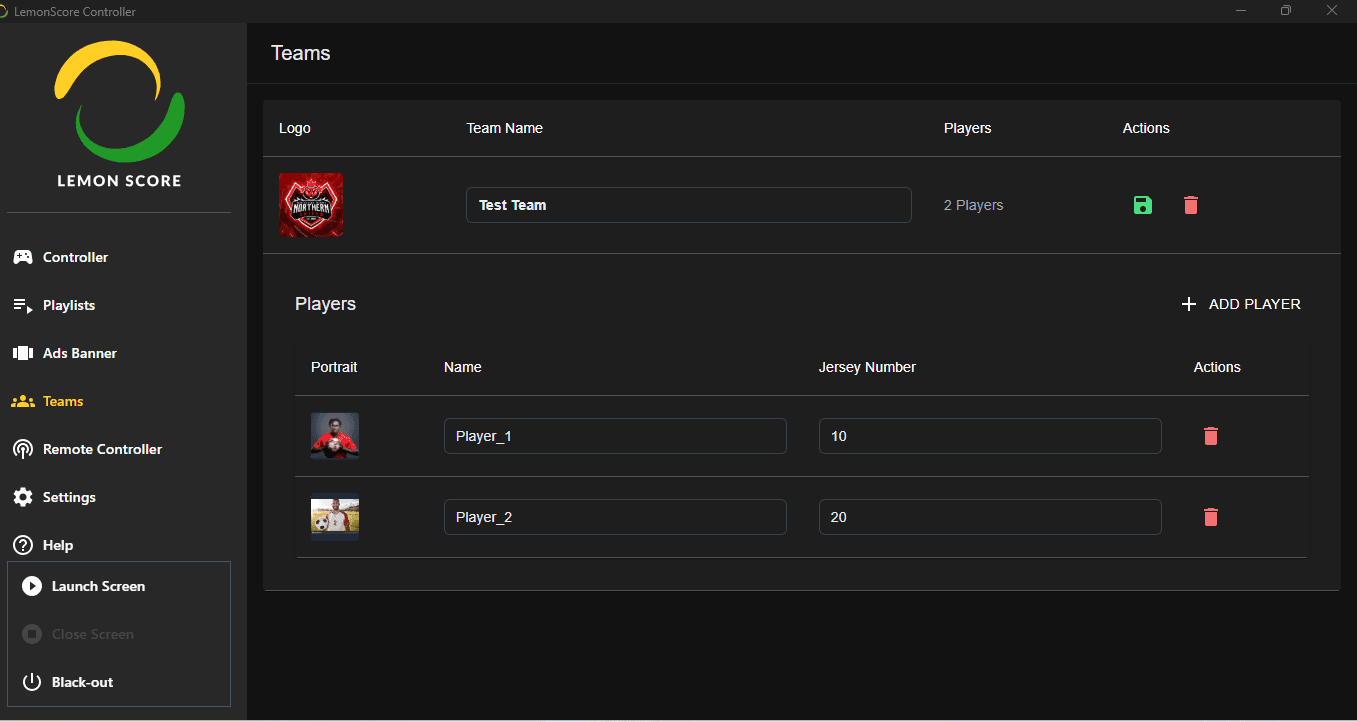
The Teams page in LemonScore lets you manage and organise the teams that take part in matches. Here you can add, edit or delete teams and manage their players.
Overview
The Teams page consists of the following areas:
Logo column: shows the official team logo (if uploaded). If no logo is set, a placeholder is shown.
Team name column: shows the name of the team (for example FC Barcelona, Real Madrid, Paris Saint-Germain).
Players column: shows the number of players currently added to the team (for example "2 players").
Actions column: offers the following quick actions for each team:
- Edit: update team details (name, logo or players).
- Delete: permanently remove the team from the system.
Add team: at the bottom of the page, the + Add team button lets you create a new team.

Team details and player management
This area shows the team details and lets you update the players.
Team section (upper panel)
Logo: shows the team logo. You can upload your own image. If no logo is uploaded, a default placeholder is shown.
Team name: editable field where you enter the team name (for example Test Team).
Player count: shows the total number of players currently added to the team (for example 2 players).
Actions
- Save (green floppy disk icon): saves all changes to the team and its players.
- Delete (red bin icon): permanently removes the team from the system.