Penalty shootout on the scoreboard: layouts and templates
Design the penalty shootout display on your scoreboard: 10 templates, a reworked Layout Editor, a playlist area and an online gallery in LemonScore 1.6.

Dario Tschannen
Published on
Cup tie, 1-1 after 120 minutes, and the shootout is about to start. The stand is fuller than it has been all season, and this is exactly when the scoreboard, with its score, match clock and club design, disappears behind a display that looks the same at every ground. With LemonScore 1.6 you design the penalty shootout on the scoreboard yourself: from 10 templates, in the reworked Layout Editor, and if you like, in a way that keeps the scoreboard visible underneath. On top of that there is a playlist area for scoreboard layouts and an online gallery of ready-made templates.
10 penalty shootout layouts for the scoreboard
Under Settings › Screen there is a new Penalty shootout layouts section. The Standard card is the display you already know. It adapts to any resolution but can't be edited. Next to it you create your own layouts and design them freely, just like a scoreboard layout.
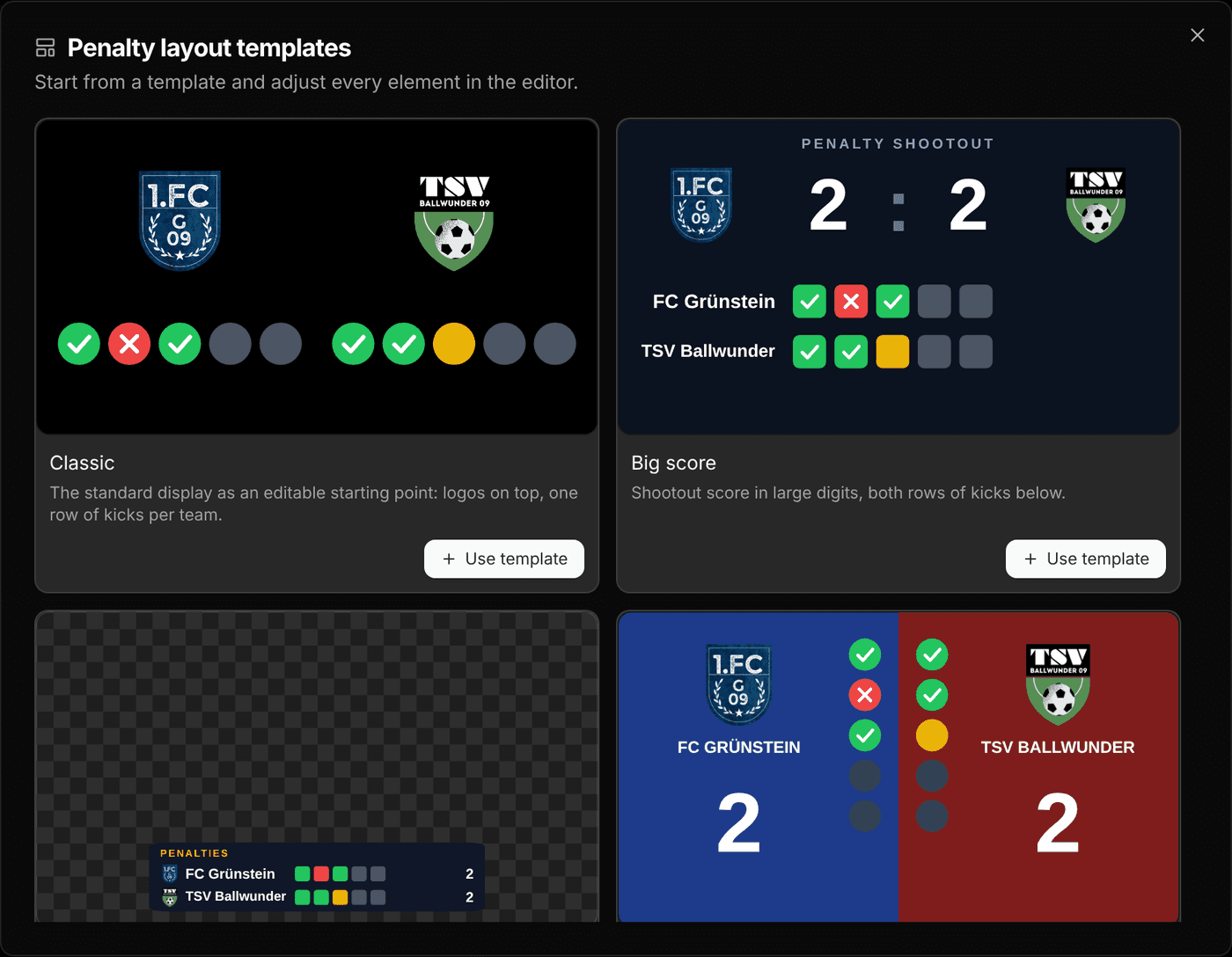
The Penalty layout templates dialog gives you 10 starting points:
- Classic: the standard display as an editable copy, with logos on top and one row of kicks per team.
- Big score, Split, Stadium, Neon, Clean light and Showdown: full-screen variants, from a night-sky backdrop with glass cards to a bright, minimal row per team.
- Broadcast bar, Top bar and Side panel: these three carry the Over scoreboard badge. They have a transparent background and sit on top of the running scoreboard, so score and match clock stay visible throughout the shootout.
All templates are built for 1920 × 1080 pixels. If your LED wall has a different format, adjust the template in the editor.
How to set up your own penalty shootout layout
- In the Penalty shootout layouts section, click Templates.
- Pick a template and click Use template. LemonScore creates a copy and opens it in the Layout Editor.
- Adjust colours, fonts and logos, then click Save.
- Go back with the arrow at the top left and click Activate on the layout's card.
From now on this layout appears as soon as anyone starts a shootout on the controller. Operating it stays the same: record a goal or a miss, LemonScore switches teams and spots sudden death by itself.
For penalty layouts the editor has its own building blocks. The Penalty elements button adds Team 1 Kicks, Team 2 Kicks, Team 1 Penalty Score, Team 2 Penalty Score and the Sudden Death Badge. For each row of kicks you set the Marker colours for goal, miss, next and pending kick, the Marker shape (Circle, Rounded or Square) and the Direction. The Show over the scoreboard switch makes the background transparent.


The individual steps are covered in the penalty shootout docs.
The reworked Layout Editor
The Layout Editor has been around for a while. Version 1.6 extends it considerably, and scoreboard and penalty layouts both benefit:
- Fonts: 8 fonts ship with LemonScore, including Bebas Neue, Oswald, Teko and Roboto Condensed. They look the same on every computer, including the LemonScore Controller.
- Shapes with gradients: rectangle, circle, star, hexagon, arrow and line, in a solid colour or with a linear or radial gradient. You build bars and panels right in the editor instead of in a graphics program.
- Copy and paste: components can also be moved from one layout to another, for example the club badge with its frame.
- Clock: the time of day is now also available as an analogue clock.
- Stoppage time: the Extra-Time Badge and the Stoppage Timer are separate layers you can place anywhere. When they appear depends on the match clock, see the post on match clock, match format and timer tones.
- Show banners: shows the advertising banners in the editor so you keep that area clear.
Every feature is described in the Layout Editor docs.
Show sponsors and keep the score with the playlist area
Until now a running playlist covered the whole screen. Anyone showing sponsor videos at half-time lost the score for that time. Now you can add a Playlist Area in the Layout Editor. While the layout is active, the playlist plays only inside that area and the scoreboard stays visible. Under Media fit you choose Fit (the whole image is visible) or Fill (the area is filled completely and the edges are cropped).
If you would rather not build it yourself, Templates has three ready-made layouts in the Scoreboard + playlist section: Stadium wall, Score bar + playlist and Playlist + side bar. Clicking Add creates a copy and opens it in the editor.
Layout templates from the online gallery
The Browse Layout Templates dialog has three sections: Standard with the built-in layouts Basic 1 and Arena 3, Scoreboard + playlist, and Online. The Online section holds templates from the LemonScore online gallery. Install adds a template as your own layout, after which the button reads Installed. The search field filters all sections. You can preview the templates beforehand on the templates page.
To pass on one of your own layouts, use Export in the card menu. It saves an .lslayout file with the images included. Import loads that file on another computer. That way you can build a layout at home in peace and bring it to the clubhouse on a USB stick, without restoring a full backup. More in the layouts docs.
Test a new penalty layout before the cup tie: start a shootout on the controller, record a few kicks and close it again with End. The score on the team cards does not change.
Who it is for and which plan you need
Your own penalty shootout layouts are worth it for any club that plays cup ties, tournaments or youth finals that can end in a shootout. The over-the-scoreboard variant is a good fit when spectators should still see how the match stood after 120 minutes while the kicks are taken, and your scoreboard design stays on screen. How layouts, match clock and sponsor slots work together in the software for your scoreboard is shown in the overview.
The Layout Editor, penalty shootout layouts, templates and the online gallery are included in every plan and in the demo. The playlist area shows playlists, and playlists are part of the Pro and Enterprise plans. For livestreams there are separate penalty shootout templates in the stream overlay for OBS and vMix. For everything else that is new, see the LemonScore 1.6 overview.