Stream Deck and shortcuts: run the scoreboard at a button press
Stream Deck and shortcuts in LemonScore 1.6: a plugin with 10 actions and one-click pairing, shortcuts with 52 actions, confirmation, test and run log.

Dario Tschannen
Published on
The half-time whistle goes. The announcer reads out the score, and at the same moment someone needs to stop the match clock, bring up the sponsor banner and start the half-time music. That is three clicks in three places, and in the rush one of them gets forgotten. With LemonScore 1.6 you can put a routine like this on a single button, and with Stream Deck and shortcuts that button becomes a real key. The Stream Deck plugin is now officially available, and shortcuts have been redesigned. This post shows what both can do and how to set them up.
10 actions on physical keys with the Stream Deck plugin
An Elgato Stream Deck is a small keypad with a display in every key. With the LemonScore plugin each key shows the current state, such as the score or the running clock, and a press triggers the action. Up to version 1.5.2 the plugin was only a hidden experiment. It now comes with 10 actions:
- Team Controller: goal +1 or −1, show the score or team logo, reset both scores
- Clock Controller: show, start and stop the match clock
- Animation and Animation Player Select: pick or trigger an animation, with player selection on the keys
- Penalty Shootout: start and end the shootout, record a goal or a miss, undo
- Playlist, Banner, Blackout and Music: control playlists, advertising banners, blackout and music
- Shortcut: trigger a shortcut from LemonScore
The plugin needs the Stream Deck software version 7.0 or later and runs on macOS 13 or Windows 10 and newer. Install it from the Elgato Marketplace or by double-clicking the file ending in .streamDeckPlugin.
Pairing the Stream Deck with one click or over the network
On the same computer, pairing takes one click and no typing:
- In LemonScore, open Settings › Connectivity.
- On the Stream Deck card, under This computer, click Connect Stream Deck.
- LemonScore hands the connection details to the Stream Deck software. The card then shows Paired.

If the Stream Deck is plugged into another computer, for example a second operating position in the announcer's booth, switch on Allow Stream Deck on other computers and click Create token. The Connect a Stream Deck on another computer dialog shows the Host, Port and Token. Enter these values on the other computer in the Connection section of a LemonScore key. The token is only shown once. Disconnect all removes every pairing again. The individual steps are in the Stream Deck documentation.
52 actions on one button with shortcuts
Shortcuts are your own buttons that run one or more actions in sequence. They sit on shortcut cards on the controller and also appear in the remote control, in the mobile app and, through the Shortcut action, on the Stream Deck. Version 1.6 offers 52 actions in twelve categories: Clock, Score, Penalty, Timer, Playlist, Music, Animation, Banner, Display, Layout, Brightness (Coex) and HTTP Request. New ones include setting the clock mode and match format, playing a single clip from a playlist, pausing and resuming a playlist, switching animation sets, turning timer tones on and off, and switching between layouts.
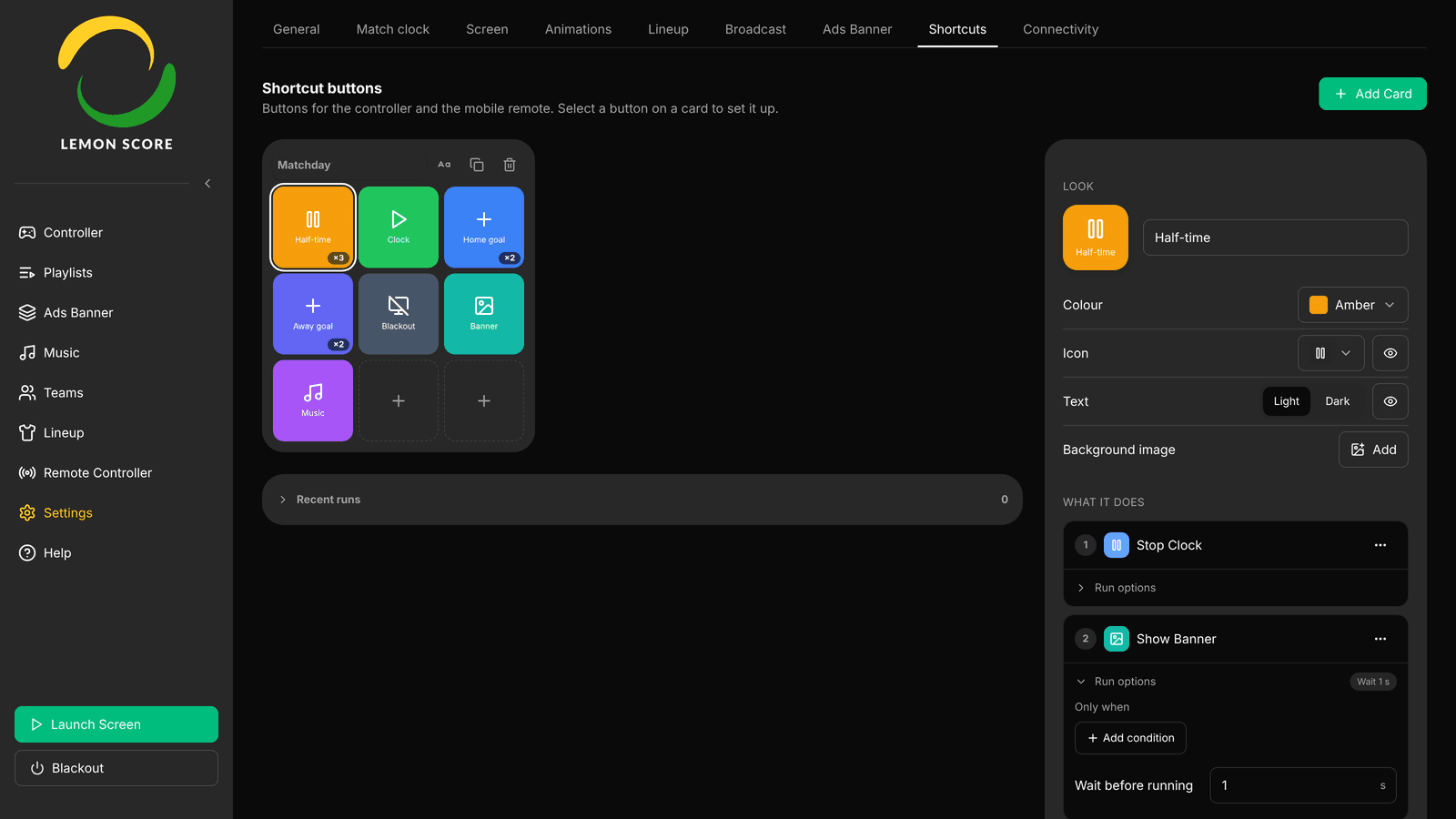
Here is how to build a half-time button:
- Open Settings › Shortcuts and click Add Card. Choose 2x2 or 3x3 as the Grid Size.
- Click an empty button, then under What it does click Choose what this button does….
- Pick Stop Clock.
- Use Add another action to add Show Banner and Play Music Playlist. A button runs up to 5 actions.
- Under Look, set the label, Colour and Icon, for example "Half-time".
There is no save button: LemonScore saves the button as soon as everything is filled in.
Under Run options you can tie an action to conditions such as Clock is running or Banner is visible and add a wait of 0 to 30 seconds. That way the music only starts once the banner is up.
Toggles, confirmation, Test and Recent runs
Four additions make shortcuts safer during a match:
- Toggles with their own look: if a button contains an action such as Start / Stop Clock or Toggle Blackout, Look has two tabs, Normal and When on. The button can then show a red "Blackout on" and otherwise a grey "Blackout off".
- Ask before running: the controller asks first, for example "Execute Half-time?", and only runs the button after Execute. Useful for anything the crowd sees straight away.
- Test: one click in the editor really runs the button and shows under Test result whether each action worked.
- Recent runs: below the cards you see the last 20 runs since LemonScore started, with the result and where they came from, such as Stream Deck or Web remote. This is where you find out why a button did nothing.

Test also runs the actions on the scoreboard. Check new buttons before kick-off, not during the match.
Every option, including HTTP requests to other systems such as a lighting controller, is described in the shortcuts documentation.
Match-day tips
- Create one card per job, for example "Break" and "Sponsors". You can have up to 10 cards.
- Put the actions you use most during play on the Stream Deck: goals for both teams, the match clock and a goal animation. Half-time and full time run as a shortcut on a single key.
- Custom animations are only offered in shortcuts when they belong to the active animation set. More on that in the post about the animation editor.
- If a playlist or layout is deleted, a button that points to it is no longer ready and shows a ?. Check your buttons after tidying up.
Available in Pro, Enterprise and the demo
Shortcuts and the Stream Deck come with LemonScore Pro and Enterprise, and they are included in the demo. Basic has no shortcuts. The Stream Deck does not need an API key or the Enterprise plan, even though the API itself is Enterprise-only from version 1.6. For grounds without a fixed booth, the LemonScore Controller is also available as a Case with a built-in Stream Deck. Everything else in version 1.6 is covered in LemonScore 1.6: what's new. How Stream Deck, phone and Controller work together in the scoreboard software is shown in the overview.