
Prices and features checked on 24 August 2026
KeepTheScore vs soccerBoard7 vs LemonScore: scoreboard software for football clubs compared
Three very different answers to the same question: what should run the score on our screen? A browser tool, a Windows program with a lifetime licence, and a desktop app for Windows and macOS built around sponsor revenue. This page compares them on the criteria that matter at a football ground, with prices quoted from the vendors' own pages and the date we checked them.
- KeepTheScore
- Berlin, Germany
- Since 2016
- Browser
Free plan, USD 14 to 26 per month
Best for: Livestream overlays and quick TV setups
- soccerBoard7
- Ankara, Turkey
- Since 2018
- Windows only
Lifetime licence, USD 500 to 2'000
Best for: Stadium LED operators on Windows
- LemonScore
- Switzerland
- Football-first
- Windows and macOS
Subscription, from CHF 40 per month
Best for: Clubs that sell sponsor slots on the board
Who each product is for
None of the three is a bad product. They are built for different people, and that is the first thing to get right.
KeepTheScore
- Berlin, Germany
- Since 2016
- Browser
Livestream overlays and quick TV setups
A browser scoreboard from a two-person company in Berlin, founded in 2016. You open a control URL on your phone and a display URL on any screen; nothing is installed. Its primary use case is the livestream overlay (OBS, vMix, Streamlabs, XSplit), with a TV or projector in the venue as the secondary use. It is the right pick for streamers, school gyms and anyone who needs a score on a clubhouse TV in the next five minutes. It does not make or sell hardware and does not integrate with LED controllers.
soccerBoard7
- Ankara, Turkey
- Since 2018
- Windows only
Stadium LED operators on Windows
A Windows program from an independent developer in Ankara, offered since 2018 as one of ten sport-specific boards covering 38 sports. It targets stadium LED displays and lists 30 named professional stadiums as references. Strong points are named competition presets (2x45, 2x40, 2x35, 2x30), an advertising playlist engine, a PIN-protected multi-user web remote on the venue LAN and a full HTTP, TCP and UDP interface in every licence. It is the right pick for a Windows-only operator who wants a one-time licence and is comfortable buying by email.
LemonScore
- Switzerland
- Football-first
- Windows and macOS
Clubs that sell sponsor slots on the board
A desktop app for Windows and macOS from a Swiss company, built football-first for amateur and semi-professional clubs that want the screen to earn sponsor money. Score, match clock, penalty shoot-out, a rotating sponsor banner under the score, video playlists in the breaks, a drag-and-drop layout editor, LAN remote with PIN, Stream Deck plugin and Novastar COEX controller integration. It also supplies a controller and works with an LED installation partner. It is not free, and it is desktop-only: there is no browser version.
Feature matrix
Competitor details are taken from the vendors' own websites and documentation, checked on 24 August 2026. Prices are quoted as published on that date and may change; treat them as a guide.
- Included
- Partly or with conditions
- Not available
| Criterion | KeepTheScore | soccerBoard7 | LemonScore |
|---|---|---|---|
| Platform | Browser, any device with a web browser | Windows 10 and 11 only | Windows and macOS desktop app |
| Works offline | Internet required on every device (docs); basic score updates keep working once a page is loaded | Runs on the venue LAN, offline key activation | One-time online activation, then fully offline |
| Remote control | Any device via the admin URL, multi-user, over the internet | Web remote on the LAN, PIN-protected, several devices at once | Mobile app or browser on the LAN, PIN-protected, no internet |
| LED controller integration | None; laptop via HDMI into the wall's media player | None; output through the PC graphics card | Novastar COEX: brightness, temperature, cabinet status |
| Sponsor rotation and playlists | Logos on paid plans; no banner area, rotation or video playlists | Ad Playlist Engine, split-screen ads, sponsor rotations | Rotating banner under the score, break playlists (Professional plan and up) |
| Streaming / OBS | Overlay URLs for OBS, vMix, Streamlabs, XSplit and more | Live camera via OBS, screen capture, chroma key, vMix | OBS and XSplit; broadcast integration on Enterprise |
| Stream Deck | Plugin on the Elgato Marketplace, works on the free plan | Not offered | Plugin (Professional plan and up) |
| API | REST API, token-based, 5 requests per second per board | HTTP API, TCP socket, UDP broadcast in every licence | REST and WebSocket API (Enterprise plan) |
| Layout editor | Custom colours and CSS styling | Position, colour, size and font edited via CSS styles | Drag-and-drop editor plus template gallery |
| Licence model | Free tier; Plus and Pro subscriptions, monthly or annual | Lifetime licence per pixel width, 2 years of updates, bound to CPU and USB dongle | Subscription per device, monthly or annual, Basic, Professional, Enterprise |
| Published price | Free (2 boards), Plus USD 14/month, Pro USD 26/month, cheaper on annual billing (as published on 24 August 2026) | USD 500 up to 800 px, USD 1'000 up to 1'366 px, USD 1'500 up to 1'920 px, USD 2'000 up to 3'840 px (as published on 24 August 2026) | CHF plans, see the pricing page; free 15-minute demo |
| Support and invoicing | Web shop, organisation invoicing available, 30-day money-back | Purchase by email, bank transfer, Western Union or card; email, WhatsApp and phone support | Swiss company, CHF invoices; email support, phone and WhatsApp on Professional, SLA on Enterprise |
Sources: keepthescore.com pricing and documentation pages, footballscoreboardsoftware.com licence page, lemon-score.ch feature and pricing pages. Which LemonScore plan includes which feature is listed on the pricing page.
The three things that set LemonScore apart, on screen
Sponsor rotation, remote control and break playlists are the rows in the matrix where the three products differ most.
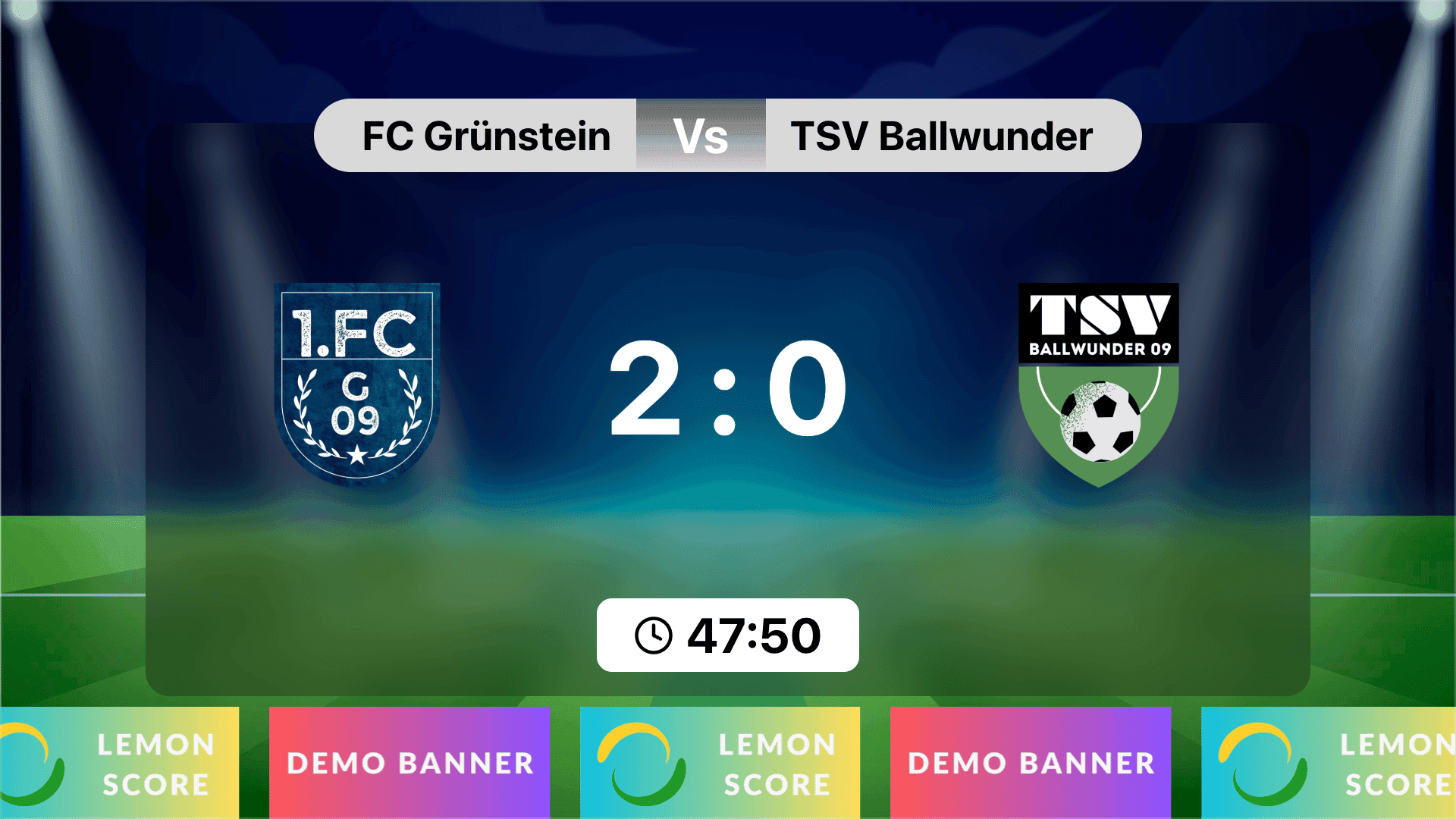
Sponsor banner rotation under the score 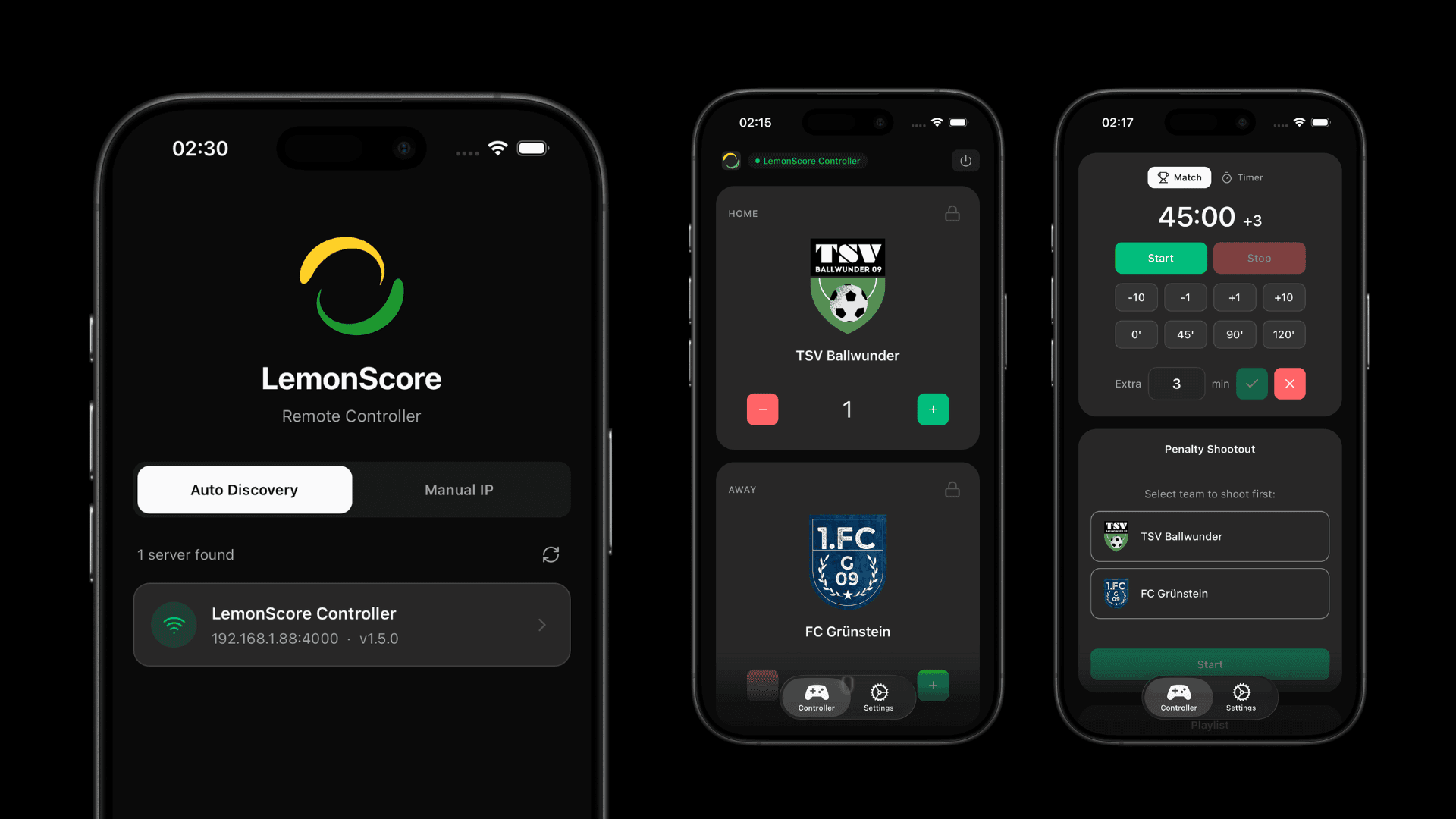
Remote control on the venue LAN, no internet 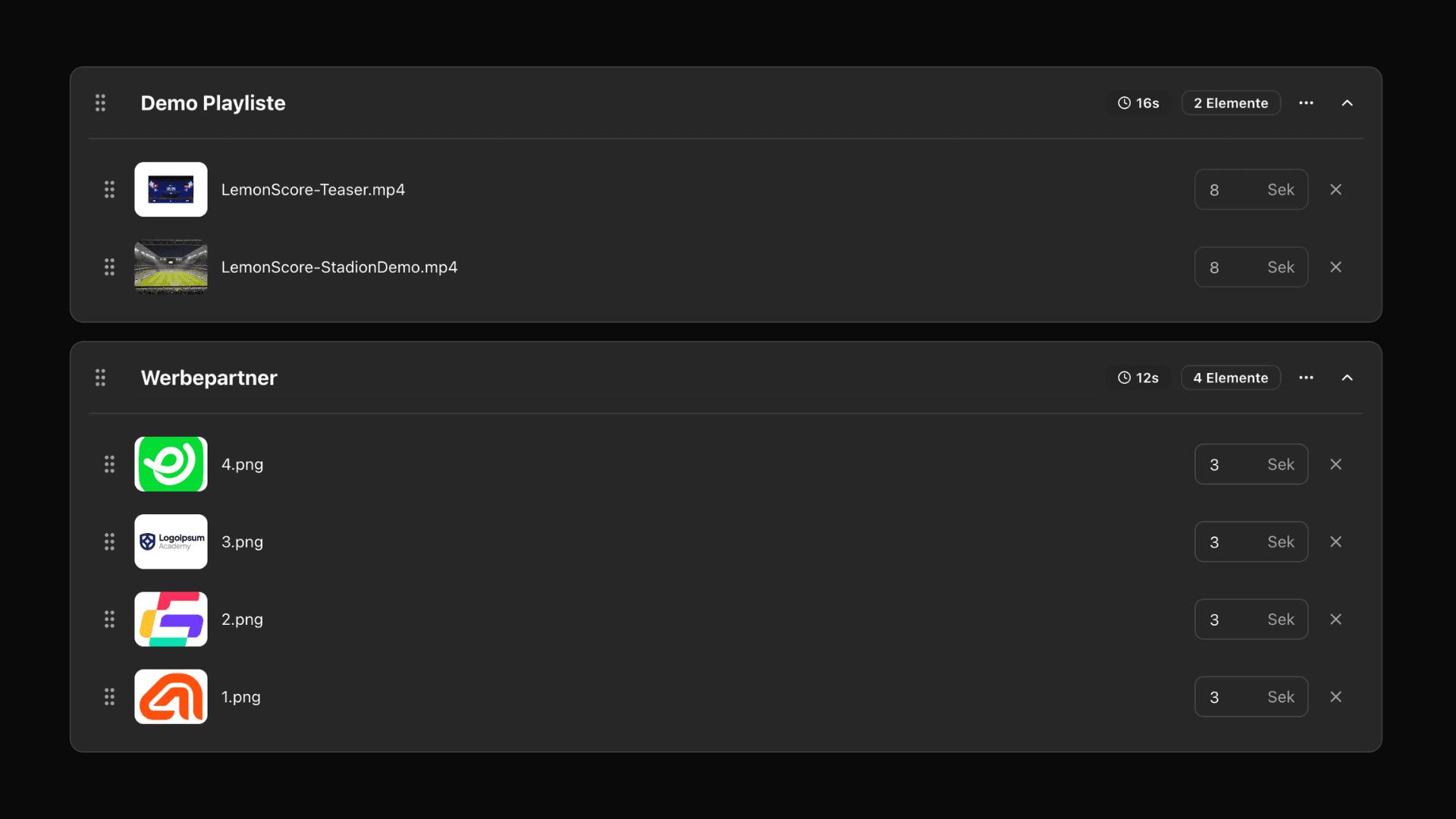
Half-time playlists with sponsor spots
Verdicts by use case
Clubhouse TV or a livestream overlay, no budget
KeepTheScore. The free plan covers two boards, the overlay URLs drop straight into OBS, and there is nothing to install. The condition is a reliable internet connection on the laptop at the screen and on the phone that controls it. If the clubhouse Wi-Fi reaches the TV, this is the quickest route to a score on screen.
Outdoor pitch without reliable Wi-Fi
soccerBoard7 or LemonScore. Both run on the laptop without internet and serve the remote control on the local network, so a travel router or a phone hotspot is enough. KeepTheScore documents that each device needs an active connection at all times, which is exactly what a crowded ground on one mobile cell cannot guarantee. Our German guide on Wi-Fi at the sports ground explains the network setup.
Stadium LED display, Windows operator, one-time purchase
soccerBoard7. A lifetime licence from USD 500, named competition presets, an ad playlist engine and a multi-user remote with role screens for clock, score and media. Points to weigh before buying: the licence is bound to one PC's serial numbers plus a dongle, updates are free for two years, layouts are adjusted through CSS rather than a visual editor, there is no Stream Deck plugin, no macOS version, and the price tier depends on the wall's pixel width, so measure your output resolution first.
LED wall paid for by sponsors, volunteers on match day
LemonScore. The rotating sponsor banner and the break playlists are the features that turn the screen into revenue, and the drag-and-drop editor lets a volunteer fit the layout to the wall's exact pixels without touching CSS. The Novastar COEX integration adds brightness and cabinet monitoring from inside the app. The fair caveats: sponsor features start on the Professional plan, the API is reserved for Enterprise, the app is Windows and macOS only, and other sports are handled through custom layouts rather than dedicated boards. Pricing is on the pricing page, and how the banner area is sold is explained under advertising on the scoreboard.
Mac users
LemonScore is the only one of the three with a native macOS app. KeepTheScore works in any browser on a Mac; soccerBoard7 does not run on macOS.
Still undecided?
Our buyer's guide to football scoreboard software covers the wider market, including hardware-bundled systems and the LED costs in Europe, and shows how sponsor slots pay for a screen. The feature list has the full LemonScore detail.
Frequently asked questions
Is KeepTheScore free for football clubs?
Yes, with limits. The free plan includes 2 scoreboards and 10 saved teams; Plus (USD 14 per month) and Pro (USD 26 per month) add more boards and teams, with a discount on annual billing, as published on 24 August 2026. Every device needs an internet connection, and there is no sponsor banner rotation or break playlist.
How much does soccerBoard7 cost?
soccerBoard7 sells a lifetime licence priced by the maximum output width in pixels: USD 500 up to 800 px, USD 1'000 up to 1'366 px, USD 1'500 up to 1'920 px and USD 2'000 up to 3'840 px, with two years of free updates, as published on 24 August 2026. The licence is bound to the PC's CPU and hard-drive serial numbers plus a USB dongle, and the purchase is handled by email.
Which scoreboard software works without internet at the ground?
soccerBoard7 and LemonScore both run offline after activation and serve the remote control on the local network. KeepTheScore runs in the browser and states in its documentation that an active internet connection is required on each device at all times; a mobile hotspot is the recommended workaround.
Which of the three runs on a Mac?
Only LemonScore ships a native macOS app alongside Windows. soccerBoard7 is Windows 10 and 11 only. KeepTheScore runs in any browser, so it works on a Mac, but as a web page rather than an installed application.
Can I test LemonScore before buying?
Yes. The download page offers a free demo for Windows and macOS that runs for 15 minutes per session and can be restarted as often as you like. soccerBoard7 offers a demo with the same 15-minute limit; KeepTheScore's free plan has no time limit but caps the number of boards.
Test it on your own screen
Download the free 15-minute demo of LemonScore for Windows or macOS, connect your LED screen over HDMI and see what your board and your sponsors would get.